
Browse Supported LLM Models
See which model deployments are wired up for runs and the Extract API, which are chat vs embedding, with per-deployment pricing and limits.
Want to know which models you can actually pick from when running a manual test or scheduling one? This page is the menu. It's read-only — Model Deployments are managed by super-admins on a system level — but it's the canonical place to check pricing, deployment IDs, and what providers are plumbed in.
What it looks like
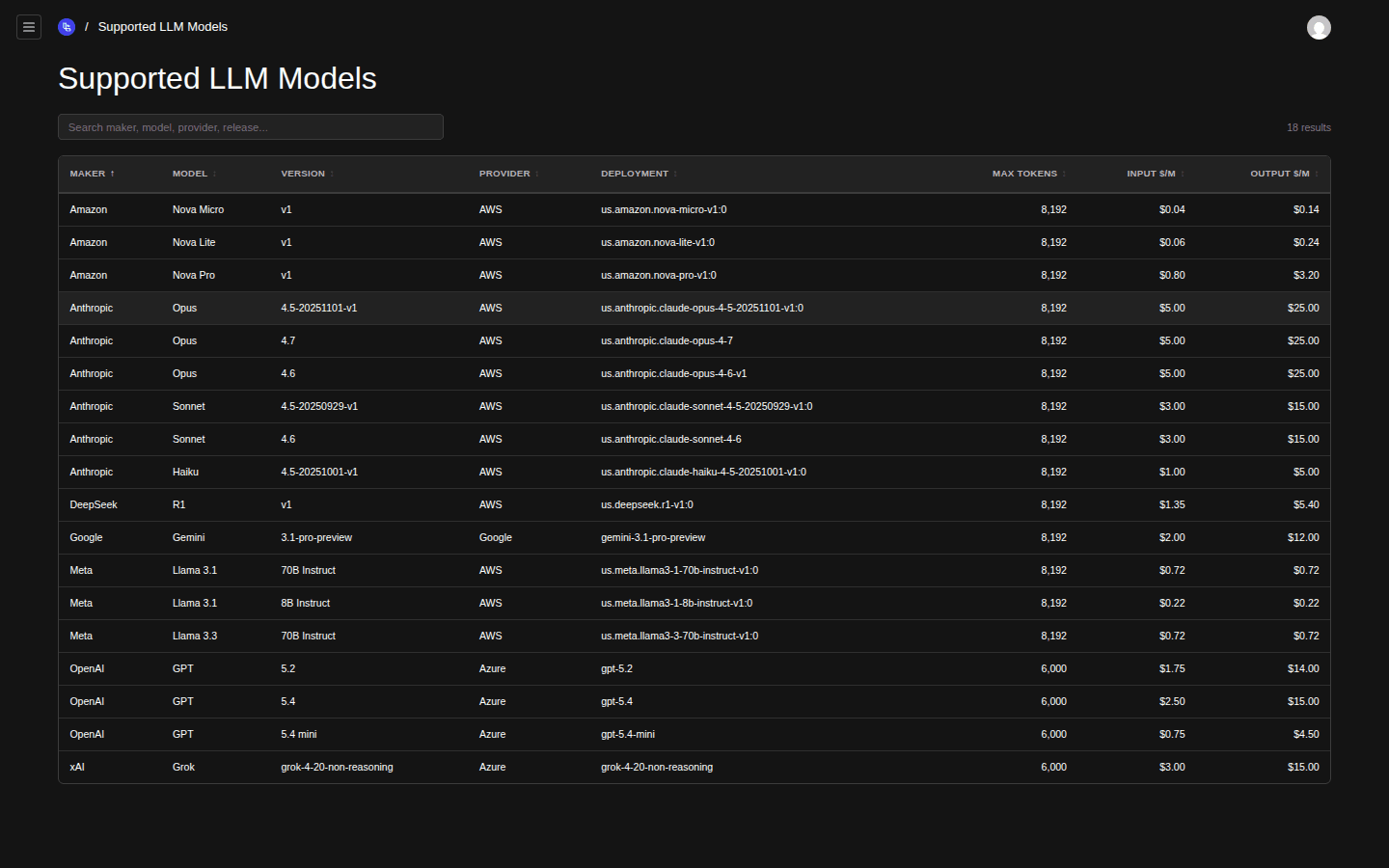
- Search box (filters by maker, model, provider, release)
- Result count
- Sortable columns
The columns
| Column | What it is |
|---|---|
| Maker | The company that made the model — Anthropic, OpenAI, Meta, Google, Amazon, DeepSeek, xAI, etc. |
| Model | The model family — Opus, Sonnet, Haiku, GPT, Gemini, Nova Micro/Lite/Pro, Llama 3.1 / 3.3, R1, Grok, etc. |
| Version | The specific version of the model. Same family, different snapshots. |
| Provider | The platform serving the model — AWS Bedrock, Azure, Google, etc. The same model often shows up under multiple providers. |
| Deployment | The provider-specific deployment identifier (e.g. us.anthropic.claude-opus-4-7 on AWS Bedrock or gpt-5.4 on Azure). This is the string the actual API call uses. |
| Modality | What the deployment does. Chat deployments run extractions — they're the ones you pick for tests and send to the Extract API. Embedding deployments turn text into vectors and can only be used by the embedding endpoint. See Chat vs embedding deployments below. |
| Max Tokens | The output token cap for this deployment. Blank for embedding deployments, which don't generate text. |
| Input $/M | Cost in USD per million input tokens for this deployment. For an embedding deployment this is the whole price — there's no output side. |
| Output $/M | Cost in USD per million output tokens, which is usually a few times higher than input. Blank or zero for embedding deployments. |
Chat vs embedding deployments
Every deployment is one of two kinds, and they're not interchangeable:
- Chat — the default, and what every deployment was before the column existed. These run structured extractions: manual tests, scheduled tests, pre-populating ground truth, and the Extract API.
- Embedding — turns a batch of text chunks into vectors (for search and similarity, not for reading a document). These are served by a separate embedding endpoint and never show up in the test-run pickers.
If you send an embedding deployment's ID to the Extract API, the request is rejected before anything is charged, with a 400 whose type is deployment_modality_mismatch. The Extract API error table has the full shape. The reverse is also blocked — a chat deployment can't be asked for embeddings.
How to use it
Three common reads:
- "Which models can I pick from in Manual Test Run?" — every Chat row in this table is selectable in Run a Manual Test and Schedule Recurring Tests, provided the underlying provider key is configured (see Manage LLM Provider API Keys). Embedding rows aren't offered there — search "embedding" to see which ones exist.
- "How expensive is X?" — sort by Input $/M or Output $/M to compare. Remember to multiply by your typical doc length and the number of docs in your test set before deciding.
- "What's the Bedrock deployment ID for Opus 4.7?" — search "opus" and copy the Deployment column.
What's not here
- Newly-released models that haven't been wired up yet. If you need a model that isn't in the list, ask the system admin — adding a deployment is a super-admin action.
- Your own deployments via "Bring Your Own Keys" — the Manage LLM Provider API Keys page is where you set up a key that lets Librari Evals call a provider on your behalf; the deployments themselves still need to exist in the supported-models catalog before you can pick them.
Related
- Run a Manual Test — pick one of these models for a one-off run.
- Manage LLM Provider API Keys — register the keys that let runs actually call these providers.
- Explore Costs — see what you've actually spent across these models so far.